
If you miss the “click and talk” simplicity of Omegle, StrangerCam on Vibecam.Site is clearly aiming for that same fast, low-friction vibe, without making you build a profile or spend 10 minutes hunting for settings. It’s built for people who want spontaneous random video chats, quick language practice, and casual cultural exchange.
We tested the experience the way most people actually use these sites: jumping in quickly, skipping often, and paying close attention to safety controls and match quality. Here’s what we found.
At A Glance: What StrangerCam Is, How Vibecam.Site Works, And Key Details
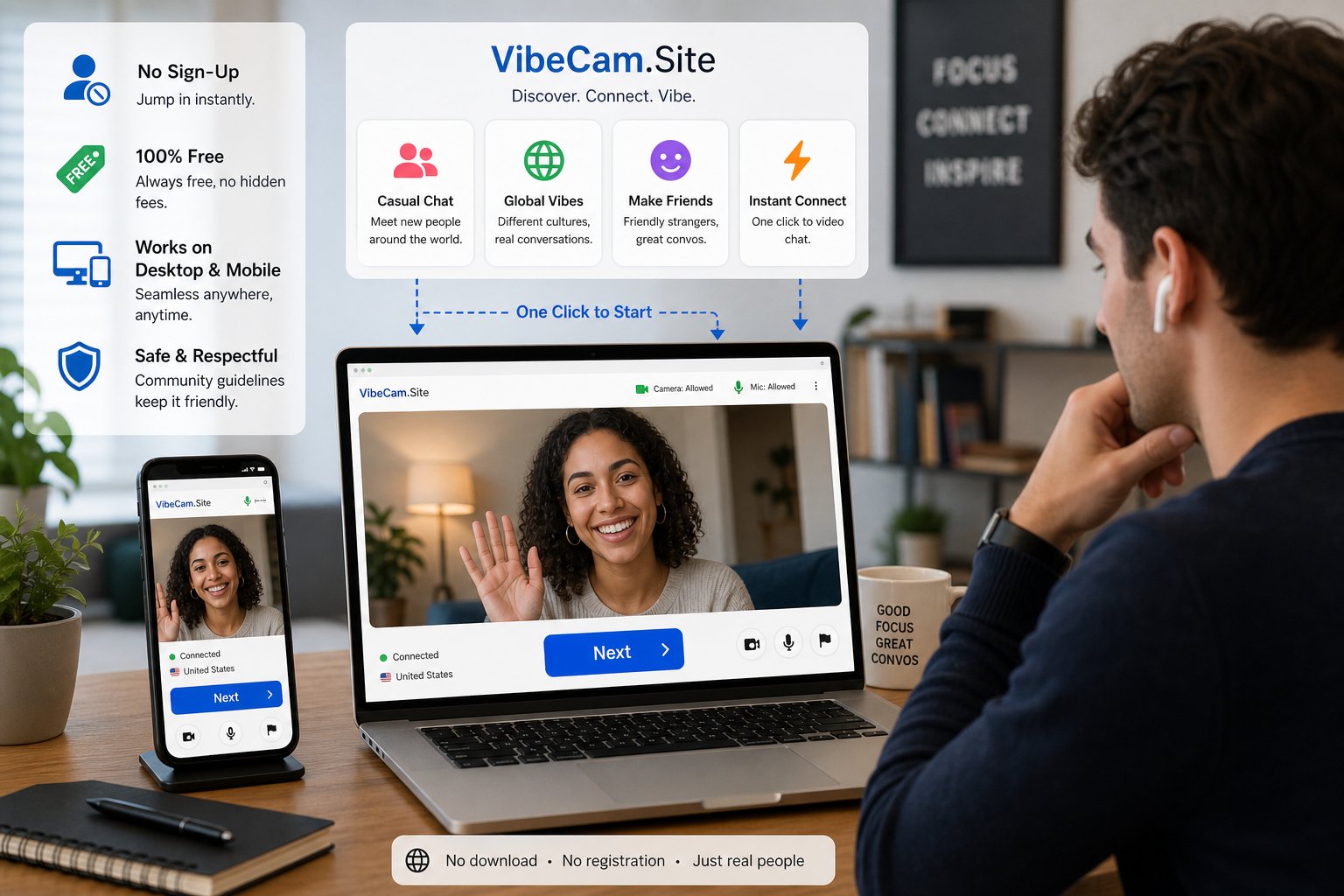
StrangerCam (as we’re reviewing it here) is the random video chat experience you access via Vibecam.Site, our directory-style hub that helps you get into instant 1:1 chats without the usual account setup.
What it is: a browser-based random video chat where you meet strangers worldwide, one at a time, with a simple “next” style flow.
How Vibecam.Site fits in: Vibecam.Site is the front door, curating and routing users into fast, hassle-free random chat experiences. The point is speed: fewer steps, fewer distractions, more talking.
Key details (quick hits):
- Best for: spontaneous chatting, casual socializing, language practice, and quick cultural exchange
- Works on: desktop and mobile browsers (camera/mic permission required)
- Sign-up: typically not required for basic use (expect occasional prompts depending on flow/partner availability)
- Cost: core access is generally free, with some features on many platforms in this category often gated (filters/boosts)
If you want the longer “how it stacks up” angle, we’ll cover alternatives later, and you can always check out our full review on VibeCam for other platforms you’re comparing.
Evaluation Criteria: How We Judged Safety, Match Quality, Usability, And Value

For this StrangerCam review, we graded the experience on four things that actually matter in real use (not marketing promises).
1) Safety & moderation
- Is there easy reporting and blocking?
- Do we see signs of active moderation (or does it feel like a free-for-all)?
- Are privacy expectations clear?
2) Match quality
- Do we get real conversations, or mostly instant skips?
- Are matches geographically/language diverse?
- Does it feel like there are enough users online to sustain decent pacing?
3) Usability
- How fast do we get from landing page to first match?
- Is the interface readable on mobile?
- Are controls obvious (mute, next, report, etc.)?
4) Value
- If it’s free, does it still feel usable?
- If filters or boosts exist, do they meaningfully improve outcomes?
We also kept a “reality check” lens: random video chat is messy by nature. The best sites don’t eliminate that, they manage it with better tools and clearer boundaries.
Setup And First Use: From Landing Page To First Match (No-Lengthy-Sign-Up Claim)

The first impression is mostly about one thing: speed. In our testing, getting started was straightforward, no long onboarding, no profile building, no “add five interests” gatekeeping.
Here’s the typical first-use flow:
- Land on the page and hit the obvious Start/Chat button.
- Allow camera and microphone permissions.
- You’re placed into a 1:1 match.
What we liked: the experience doesn’t try to be a social network. It’s a tool for talking, not an identity project.
What to watch for: if you’re on mobile and your browser is strict, permissions can feel finicky. Also, your first few matches may be rapid-fire skips until you hit someone who’s actually ready to talk.
Bottom line: the “no lengthy sign-up” claim mostly holds up for basic use, which is exactly what ex-Omegle users want.
User Experience And Match Flow: Filters, Pacing, And Conversation Continuity

Random chat lives or dies on pacing. Too slow and you bounce. Too chaotic and you never get past “hi.” StrangerCam via Vibecam.Site leans into the classic “next” loop, which is good for quick discovery but can be rough if you want longer conversations.
Filters
We’re keeping this honest: across the random chat space, strong filters (especially gender filters) are often limited or monetized. On the base experience, expect broad matching first. If you’re looking for highly specific filtering, you may be better off with a more “cam-site style” platform (we’ll name options below).
Pacing
- When user volume is decent, matches come quickly.
- When it’s slow, you’ll notice more repeats and more waiting.
Conversation continuity
This is the trade-off: the system is built for instant replacement, not reconnecting. If you’re hoping for “find someone again,” random chat generally isn’t great for that.
Our take: it’s best used in 15–30 minute sessions. You’ll get more value treating it like a quick social roulette than trying to build long-term connections.
Safety, Moderation, And Privacy: Reporting, Blocking, And Data Expectations

Safety is where a lot of Omegle alternatives either improve… or completely fall apart. For this StrangerCam review, we focused on what users can control in the moment.
Reporting & blocking
At minimum, you want:
- Report: for harassment, nudity, spam, or aggressive behavior
- Block/skip: immediate exit without friction
In practice, the most important “safety feature” is how fast you can leave a bad chat. StrangerCam’s style of instant skipping is actually a plus here.
Moderation reality
Let’s be real: live video moderation is hard at scale. Even with rules, you may still run into:
- people trolling
- explicit content
- bots or scammy links
Privacy expectations
Treat random video chat as public-ish:
- Don’t share your full name, phone number, workplace, or exact location.
- Assume screenshots are possible.
- Use a secondary email if anything asks for one.
If you want a more controlled environment, consider platforms with stronger verification or paid barriers (they’re not perfect, but they reduce chaos). And if safety is your top priority, browse vetted options on Vibecam.Site and check out our full review on VibeCam for safer picks.
Conversation Quality For Language Practice And Cultural Exchange
This is where StrangerCam can be surprisingly useful, if you use it intentionally.
If you’re doing language practice, the biggest win is volume: you can meet a lot of people fast, which is great for practicing greetings, small talk, and listening comprehension.
What works well:
- Beginner practice: repeating introductions, common questions, pronunciation reps
- Cultural exchange: quick “what’s it like where you live?” chats
- Confidence building: lowering anxiety through repetition (every chat is a fresh start)
What doesn’t:
- Deep, structured learning (you’ll be interrupted by skips)
- Long discussions that require continuity
Our tip: open with a clear prompt like, “Hey, can I practice English for two minutes?” You’ll still get skips, but the people who stay are usually more cooperative. Keep a few backup questions ready and you’ll get better sessions.
Performance And Reliability: Video/Audio Quality, Latency, And Mobile Compatibility
Performance on random video chat is a mix of your connection and the other person’s setup. That said, we can still judge consistency.
Video/audio quality
When connections were stable, quality was solid enough for conversation, nothing “studio crisp,” but totally usable. Expect occasional:
- blurry video in low light
- audio clipping from cheap mics
- abrupt disconnects
Latency and drops
Latency spikes usually happened when matches were far away geographically or on weaker mobile networks. Most of the time, hitting “next” fixed it faster than trying to salvage a laggy chat.
Mobile compatibility
Mobile browser use is fine, but it’s best when you:
- use Chrome/Safari updated
- connect on Wi‑Fi
- wear earbuds to avoid echo
If you’re planning long sessions, desktop is still the smoother experience. For quick check-ins or casual chats, mobile is totally workable.
Pros And Cons: The Biggest Wins And Most Common Friction Points
.Inline image: StrangerCam review
Caption: The biggest trade-off with random video chat: speed and simplicity vs. inconsistency and safety noise.
Here’s the cleanest way to put it.
| Pros | Cons |
|---|---|
| Fast start (no profile-building vibe) | Match quality varies a lot by time of day |
| Great for quick social connection and low-stakes chats | You may hit trolls / explicit behavior like most random chat sites |
| Works well for language practice reps | Continuity is weak (hard to reconnect) |
| Simple “next” flow makes it easy to leave bad chats | Filters are often limited in the base experience |
| Browser-based (no heavy install) | Mobile permissions/echo can be annoying without earbuds |
If you want maximum control (filters, verified users, less chaos), you’ll probably prefer a more structured alternative. If you want the old-school roulette feeling, this nails it.
How It Compares: Vibecam.Site Vs Other Random Video Chat Platforms
For anyone searching “StrangerCam review,” the real question is usually: “Is this better than the other Omegle alternatives?” Here’s the practical comparison.
| Platform | Best for | Free? | Filters | Overall vibe |
|---|---|---|---|---|
| Vibecam.Site (StrangerCam experience) | Fast random video chats, casual talk, language reps | Usually yes | Limited/basic | Classic roulette, low friction |
| Chatroulette | Big user base, quick matching | Yes | Some | More mainstream, still unpredictable |
| Emerald Chat | Interest-based chatting, cleaner community feel | Yes | Some | More “community rules,” less chaos |
| CooMeet | More curated 1:1 dating-style video chat | Mostly paid | Stronger | Higher intent, less random, more polished |
Our read:
- If you want pure speed and “just match me,” StrangerCam via Vibecam.Site is a solid pick.
- If you want a slightly more managed community, Emerald Chat often feels calmer.
- If you specifically want dating-flavored matches and are okay paying, CooMeet is the more controlled lane.
We keep a rotating list of options as platforms change, so if you’re comparison shopping, check out our full review on VibeCam and browse the directory for current standouts.
Verdict: Who StrangerCam (Vibecam.Site) Is Best For, Who Should Skip, And Overall Recommendation
.Inline image: StrangerCam review
Caption: A quick verdict moment, who this random video chat style works for (and who it’ll annoy).
Our verdict: StrangerCam on Vibecam.Site is a good, no-drama option if you want instant random video chats with minimal setup. It’s not trying to be a dating app or a social platform, it’s roulette, and it owns that.
Best for
- People who miss Omegle’s simple “next” experience
- Anyone who wants quick language practice with lots of repetitions
- Users who prefer no long sign-ups and no profile management
Who should skip
- If you need strong filters or curated matches every time
- If you want consistent, long conversations with reconnect features
- If you’re very safety-sensitive and don’t want to risk occasional explicit/troll behavior
Star rating
4.1 out of 5 ⭐⭐⭐⭐☆
It delivers on speed and usability. The downsides are basically the same ones that come with any random video chat: inconsistency, occasional weirdness, and limited control.
FAQ
Is StrangerCam on Vibecam.Site free?
Most users can start chatting for free. Some platforms in this category may place advanced filters or boosts behind paid options, so expect that possibility.
Do we need to create an account to use StrangerCam?
Typically, no for basic chatting. You’ll usually just grant camera/mic permissions and start.
Is StrangerCam safe to use?
It can be reasonably safe if you use smart habits: don’t share personal info, leave bad chats instantly, and report/block when needed. But like all random chat sites, you can still run into trolls or explicit content.
What’s the best time to use StrangerCam for better matches?
Evenings and weekends usually have higher traffic, which improves pacing and reduces repeat matches.
What’s the best alternative if we want more control?
If you want a cleaner, more guided feel, try Emerald Chat. If you want a more curated dating-style experience and don’t mind paying, CooMeet is often the move.
If you’re ready to try it, jump into StrangerCam on Vibecam.Site and see how the match flow feels at your usual chat times. And if you want backups (or something more filtered), explore the directory and check out our full review on VibeCam for the best updated Omegle alternatives.
StrangerCam Review FAQs
What is StrangerCam on Vibecam.Site?
StrangerCam on Vibecam.Site is a browser-based random video chat platform that lets you meet strangers worldwide instantly without lengthy sign-ups, designed for quick, spontaneous conversations and casual cultural exchange.
Do I need to create an account to use StrangerCam?
Typically, no account creation is required. You just grant camera and microphone permissions and start chatting, making it a hassle-free experience for spontaneous video conversations.
Is StrangerCam safe to use for random video chats?
StrangerCam offers basic safety features like instant skip, reporting, and blocking. However, as with all random chat sites, users should avoid sharing personal info and be prepared for occasional trolls or explicit content.
Can I use StrangerCam for language practice?
Yes, StrangerCam is useful for quick language practice, helping with beginner-level conversations, pronunciation, and cultural exchange by meeting many people quickly for short sessions.
What are the main pros and cons of using StrangerCam?
Pros include fast start with no profile building, good for quick social chats, and browser-based ease. Cons involve inconsistent match quality, limited filters, weak conversation continuity, and potential safety issues like trolls.
What are the best alternatives to StrangerCam if I want more control?
For more control, Emerald Chat offers interest-based matching with a cleaner community, while CooMeet provides more curated, dating-style video chats with stronger filters, usually requiring payment.